Municipal Information &
Navigation
Municipal websites often contain a large amount of information spread across departments, services, programs, and topics.
Why it Matters
Finding information should feel intuitive. Clear pathways, useful connections between related content, and ongoing insight into how people actually navigate the site can reduce frustration, prevent dead ends, and make municipal services easier to understand and access.
Can a resident find basic service information without knowing which department provides it?
When it's working well
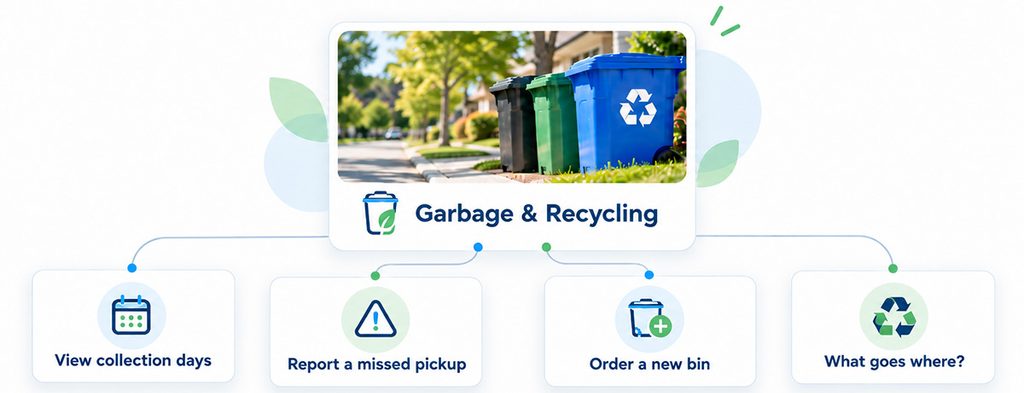
People start from what they want to do, not from a department name. Menus and search use everyday words such as "garbage" and "recycling". Each page links to the next likely step, such as the collection calendar or how to report a missed pickup.
Where to start
List the ten things people look for most often, and make each one reachable from the homepage in two clicks. Rename menu items such as "Public Works" after the tasks people come for. Search your own site for common words such as "garbage" and fix any search that returns nothing useful.
If you don't have this yet
Renaming menus after everyday tasks and linking related pages together is mostly a content change, not new software. If your site search is weak, a better search tool can usually be added to your current website. An AI assistant that answers from your own pages can come later, once the content underneath is clear.
Ideas that help
Navigation & User Pathways
APPROACH
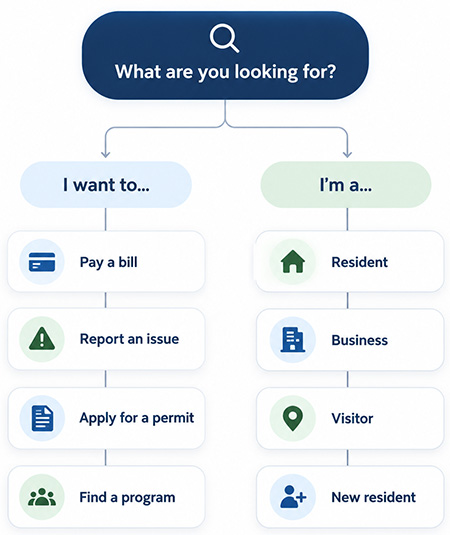
Help people find the right information by starting with what they want to do or who they are.
Municipal websites can become difficult to navigate when information is organized mainly around departments, internal teams, or unfamiliar terminology. Task-based navigation and audience-based pathways provide more intuitive entry points, helping users move quickly toward the information or service that is most relevant to them.
Good navigation should:
Connected Content & Services
APPROACH
Help people move from information to the next relevant service, task, or resource.
Information is often separated by department, program, or content type even when those topics are closely related. Connecting pages with useful related links can help residents move through the site more naturally, discover relevant services, and avoid reaching dead ends.
Connected content should:
Related ideas
- Usability & Continuous Improvement: use real feedback and behaviour to identify friction and improve the experience over time.
- Answers from your own content (optional AI tool): help people get quick, accurate answers drawn only from your own website and documents.
How well does your website work for residents?
Take the free check-up. In about 20 minutes you'll walk through everyday situations, like reporting a pothole or finding a council agenda, and get a plain-language check-up report of what's working and what to tackle first.